












Content Hub
Sync, organize, tag, categorize and surface every item
of sales, marketing and product content your team
needs — from Google Drive, Shared Drives, YouTube
channels, local devices and external URLs — in minutes.
100% Self-Serve · No Setup Fees · Cancel anytime
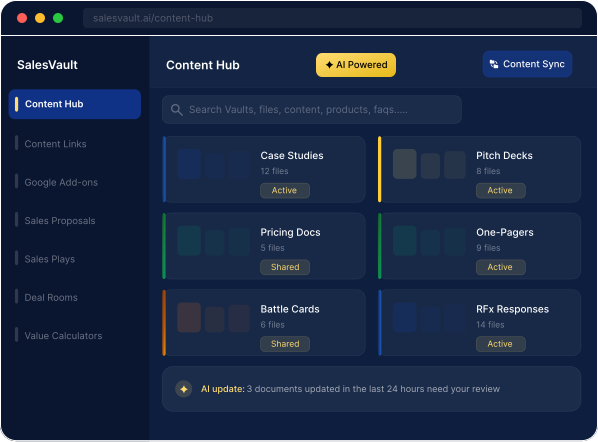
Sync, organize, tag, categorize, and surface content
your team can quickly find and deploy.
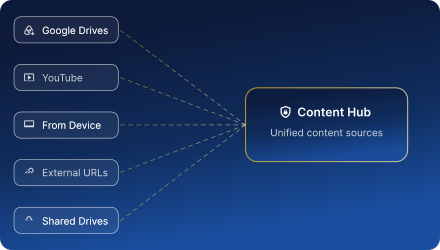
Every content source, synced in one place.
Sync content seamlessly from multiple Google Drives, Shared Drives, YouTube channels, local device files, and external URLs. SalesVault indexes all content files to the Content Hub in minutes.
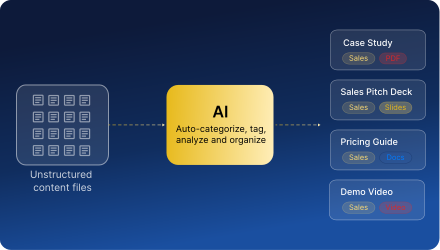
Messy files in. Organized, tagged files out.
SalesVault's AI reads every file metadata, identifies the content type and format, and assigns tags and categories automatically. What used to take weeks of manual sorting takes minutes.
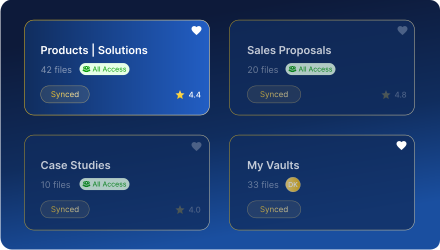
Organized by use case. Managed and secure.
AI automatically categorizes content into secure Vaults — Team Vaults for shared access, individual Vaults for personal sales, customer and business content. No manual tagging required.
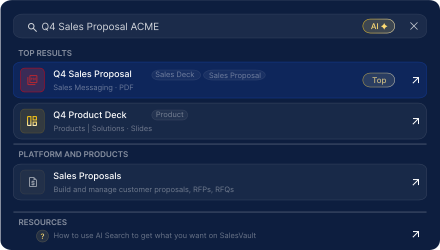
Find the right content in seconds, not folders.
Search by keyword, content type, format, or Vault. SalesVault surfaces the most relevant content instantly, irrespective of the content source — no more digging through nested folders.

"My team and I were losing hours to content management chaos before,
manually searching through multiple Google Drives and device folders. Now,
the Content Hub has auto-organized all our files in basically the same amount
of time I'd previously spend trying to find one file. No more wasted time."
All of the above, and more.
SalesVault Content Hub eliminates the manual processes depleting your team's time.

Centralized Content
One home for all content. No more scattered Drives or multiple device folders.

Role-Based Access
SalesVault follows Drive file permissions. Only the right people see the right content.

Instant Content Sync
100s of content files sync to the Content Hub from all content sources in minutes.

AI Auto-Tagging
Every file categorized and organized automatically. Zero manual taxonomy.

Auto-Sync Videos
YouTube channels synced to the Content Hub enables auto-sync of new videos.

Team & Individual Vaults
Shared access Vault and individual Vaults for all use cases, cleanly separated.
Frequently Asked Questions (FAQs)
SalesVault supports all major formats: Google Docs, Slides, Sheets, Forms, PDFs, MS Word, MS PowerPoint, MS Excel, Images (PNG, SVG, JPEG, JPG), Video (MP4, MOV etc.), Audio (MP3, WAV etc.), and external URLs.
Most teams have content synced in minutes. You can sync different content sources at the same time (Google Drives, Shared Drives, From device, YouTube Videos etc.) which get queued and sync sequentially. AI auto-categorization, tagging and mapping to Vaults runs automatically in the background.
SalesVault natively aligns with the synced Google Drive individual file permissions. If an individual file is restricted in Google Drive (View, Copy, Edit), that restriction applies in SalesVault for that specific user as well.
Team Vaults are shared content libraries for the whole team, mapped to the relevant content synced by the Admin and/or Content Manager. There are 21 Team Vaults under 5 preset categories in the Content Hub. Individual Vaults (under ‘My Vaults’) are personal content spaces where individual users store content relevant to their own pipeline, customers, opportunities, plans, territory, workflows etc.
We are actively working to integrate the SalesVault platform with popular CRMs. We will share an update once these free integrations are live.

Ready to centralize your winning content ?
All your sales, marketing, product and business content. Unified, organized and searchable across all sources.
